Intro
In questi giorni mi capita spesso di vedere, soprattutto su Instagram, dei video in cui vengono mostrate due viste affiancate: da una parte la viewport di un programma 3D in cui un utente si sta muovendo con orbita, zoom e pan, dall’altra la stessa scena che si muove allo stesso modo ma realistica, completa di materiali, texture, colori e luce, come se fosse un rendering in tempo reale in stile Unreal engine.
Muovendo la vista nella prima finestra, anche la seconda sembra aggiornarsi di conseguenza. Orbita, zoom, pan: tutto appare sincronizzato e sorprendentemente realistico. A un primo sguardo, l’impressione è quella di osservare un motore di rendering in tempo reale.
Sotto alcuni di questi post compare un invito: Commenta “link” e ti mando la guida completa, gratis!
Affiancare due video senza chiarire che uno dei due è stato generato successivamente può essere fuorviante, specie se il target è composto da persone che sanno benissimo cos’è un motore di rendering in tempo reale.
Ognuno è libero di pubblicizzare proprio lavoro o i propri prodotti come preferisce, ma questo è uno stile di comunicazione che non mi piace perché chiaramente finalizzato a ricevere commenti o visualizzazioni, facendo leva sull’urgenza di scoprire il segreto dietro quel tipo di video. Poi se il segreto non è niente di incredibile, intanto ti ho strappato un commento!
Di cosa si tratta
Basta fare una breve ricerca o chiedere a ChatGPT o avere un minimo di esperienza nella creazione di contenuti basati sull’AI per capire come sono fatti quei video. La loro realizzazione è basata su un principio molto semplice: registrare la navigazione in una scena 3D e usare quel filmato come base per generare un video realistico, guidato da immagini di riferimento. Mostrando nello stesso tempo, affiancati, la registrazione della viewport e il video finale si ha l’impressione di guardare un rendering in real time.
Come creare l’effetto “realtime rendering”
Per fare un primo esperimento (e per vedere se avevo capito bene), ho sottoscritto un abbonamento mensile Plus a Higgsfield (59 € — nel momento in cui sto scrivendo questo post), in cui sapevo di trovare Seedance 2.5, e ho generato un primo video utilizzando come input:
Content reference | una registrazione del mio schermo mentre mi muovo nella scena 3d, utilizzando la viewport di Blender
Style reference | una serie di immagini di riferimento in cui la stessa scena è già raffigurata in modo completo e realistico, con texture, materiali, luci, la persona seduta alla scrivania e il paesaggio che si vede sullo sfondo attraverso le finestre


Prompt | Per sicurezza, ho mostrato il video e le immagini di riferimento a ChatGPT chiedendo di scrivere un prompt adeguato con cui poter ottenere un video in cui la camera si muovesse come nella mia registrazione schermo (esplorando la scena) e tutto il resto venisse trasformato in modo realistico sulla base delle immagini di riferimento, specificando anche di aggiungere la ragazza nella scena, intenta a scrivere sul libro, come appare nelle immagini di riferimento.
Create a photorealistic, full-color interior video using the uploaded Blender viewport video as the camera and spatial guide, and the reference images as the finished visual appearance.


CAMERA AND SPACE

Follow the source video's camera path, framing, perspective changes, direction, speed, and timing as closely as possible. Keep one continuous shot exploring the room, with consistent parallax and spatial depth. Preserve the architectural geometry, room proportions, windows, shelving, desk, and furniture positions. The reference images show different views of ONE room; reconstruct that same room consistently throughout the shot. Do not turn the references into a slideshow or introduce cuts.


FINISHED APPEARANCE

Completely replace the gray viewport appearance with the photorealistic materials, colors, lighting, and furnishings shown in view_00, view_01, view_02, and view_03. Match the warm ivory plaster walls, pale stone flooring, dark brown and bronze mottled desk and cabinetry, dark shelving, cognac and rust-colored upholstery, brown patterned rug, aged ceramic and metal objects, and green vegetation outside the windows.


Match the natural daylight entering through the large windows on the left, balanced with warm shelf lighting and glowing decorative lamps. Maintain natural color, detailed textures, realistic reflections, soft contact shadows, and editorial interior photography quality. Keep lighting and material assignments stable as the camera moves. Newly revealed surfaces must belong to the same fully finished environment.


WOMAN AND ACTION

Add ONE woman seated in the chair behind the desk, directly in front of the open book, matching her placement in the interior references. Use face.webp as the primary reference for her face, hairstyle, clothing, jewelry, and writing posture: dark swept-back hair with shaved sides, charcoal turtleneck, olive-taupe layered garment, and a chunky amber-brown necklace.


She is quietly writing notes in the open book with a pen in her RIGHT hand. Her LEFT hand gently holds the page in place. Animate small, natural writing strokes with subtle finger, wrist, and forearm movements, gentle breathing, occasional blinking, and slight head movements while she looks down at the page. Keep her seated and absorbed in writing throughout the shot, including when she is partially hidden by furniture or outside the frame.


Her identity, body proportions, outfit, and position must remain consistent from every camera angle. Keep the pen naturally held between her fingers, with its tip contacting the page during writing strokes. The book rests firmly on the desk. Preserve correct occlusion between her body, chair, desk, hands, and book.


OUTPUT

The entire scene must already be fully photorealistic and in color from the first frame to the last. Preserve the source camera movement while adding the woman's independent writing action. Keep furniture and objects stationary and structurally stable. Avoid grayscale, clay materials, viewport outlines, interface elements, morphing, flickering textures, duplicated people, distorted hands, floating objects, and transitions from gray to color.
Il risultato è stato un video identico a quelli visti nei famigerati post IG.
Un rendering in real time risponde ai movimenti che decido di fare in quel momento. In questo caso il percorso della camera nella viewport è già pre-registrato: per mostrare lo stesso movimento in una versione realistica della stessa scena occorre generare un video indipendente.
Qualche info su Seedance
Seedance, il modello di generazione video sviluppato da ByteDance (la società di TikTok), è disponibile attraverso diverse piattaforme, tra cui Higgsfield, Dreamina, CapCut e altri servizi dedicati alla generazione di contenuti con AI.
Le versioni disponibili e le funzionalità possono variare in base alla piattaforma e al piano di abbonamento.
| Piattaforma | Seedance | Caratteristiche |
|---|---|---|
| Higgsfield | 2.0 | Piattaforma multimodello per la generazione di video AI. |
| Dreamina | 2.0 e 2.5 | Piattaforma ufficiale ByteDance. Offre anche crediti gratuiti. |
| CapCut | 2.0 e 2.5 | Generazione video integrata negli strumenti di editing. |
| Runway | 2.0 e 2.5 | Piattaforma professionale con strumenti avanzati di editing. |
| Magnific | 2.0 | Accesso a Seedance insieme ad altri modelli generativi. |
| OpenArt | Varie versioni | Generazione video e immagini con diversi modelli AI. |
| fal.ai | 2.0 | Accesso tramite API, con pagamento a consumo. |
| Krea | Varie versioni | Piattaforma multimodello per immagini e video. |
Faroe islands typical house
Fino ad oggi avevo generato solo video con movimenti di camera molto semplici e predefiniti, con Kling (2.6), o al massimo qualche multishot, sempre con Kling (3.0), con cui si possono ottenere delle inquadrature aggiuntive guidate da prompt, molto belle ma pur sempre generate per lo più dall’AI.
Questo tipo di video è senza dubbio più interessante perché permette di esplorare anche angoli della scena di cui non c’eravamo mai preoccupati più di tanto e vedere come se la cava l’AI nel ricostruire particolari di cui non possiede informazioni.
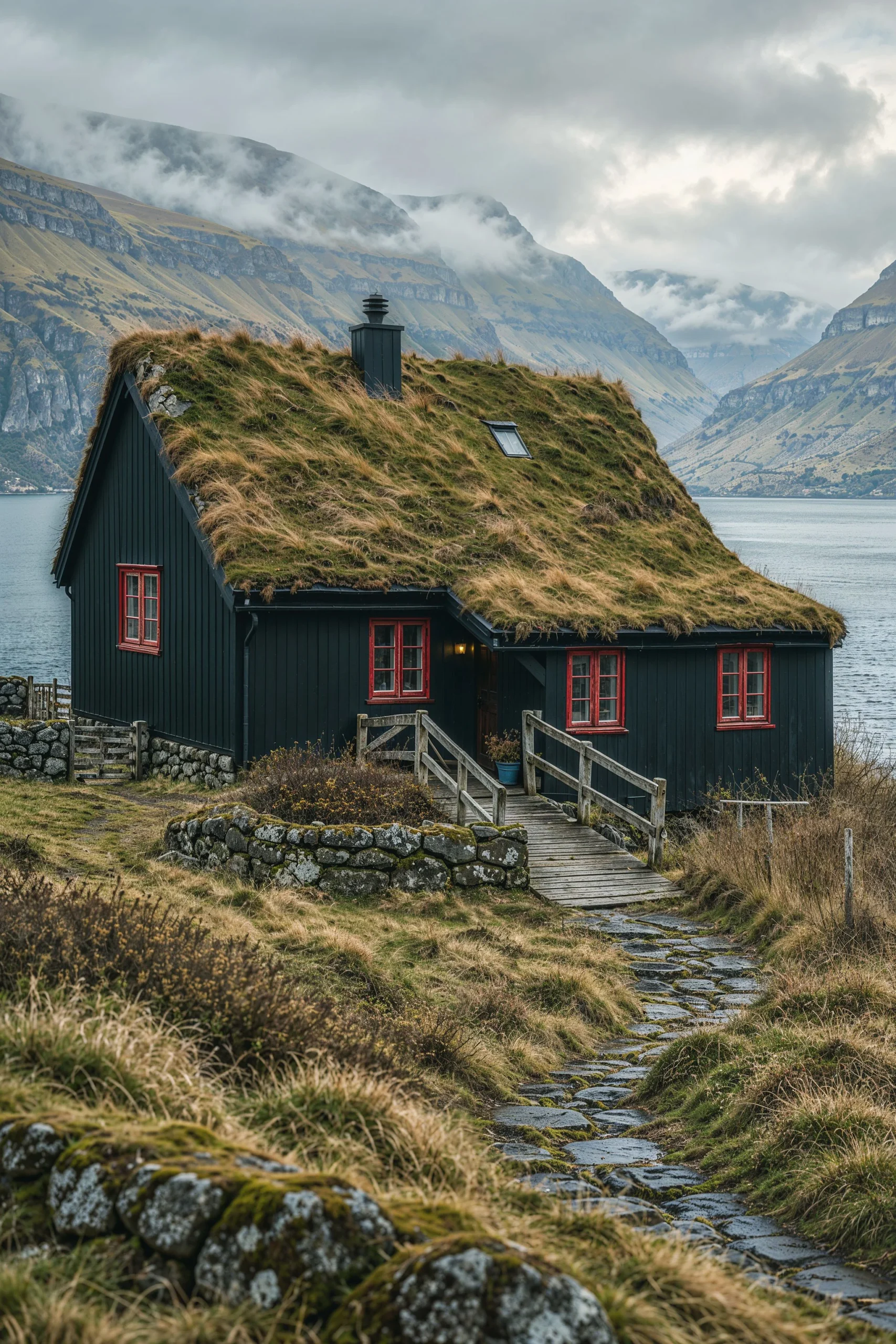
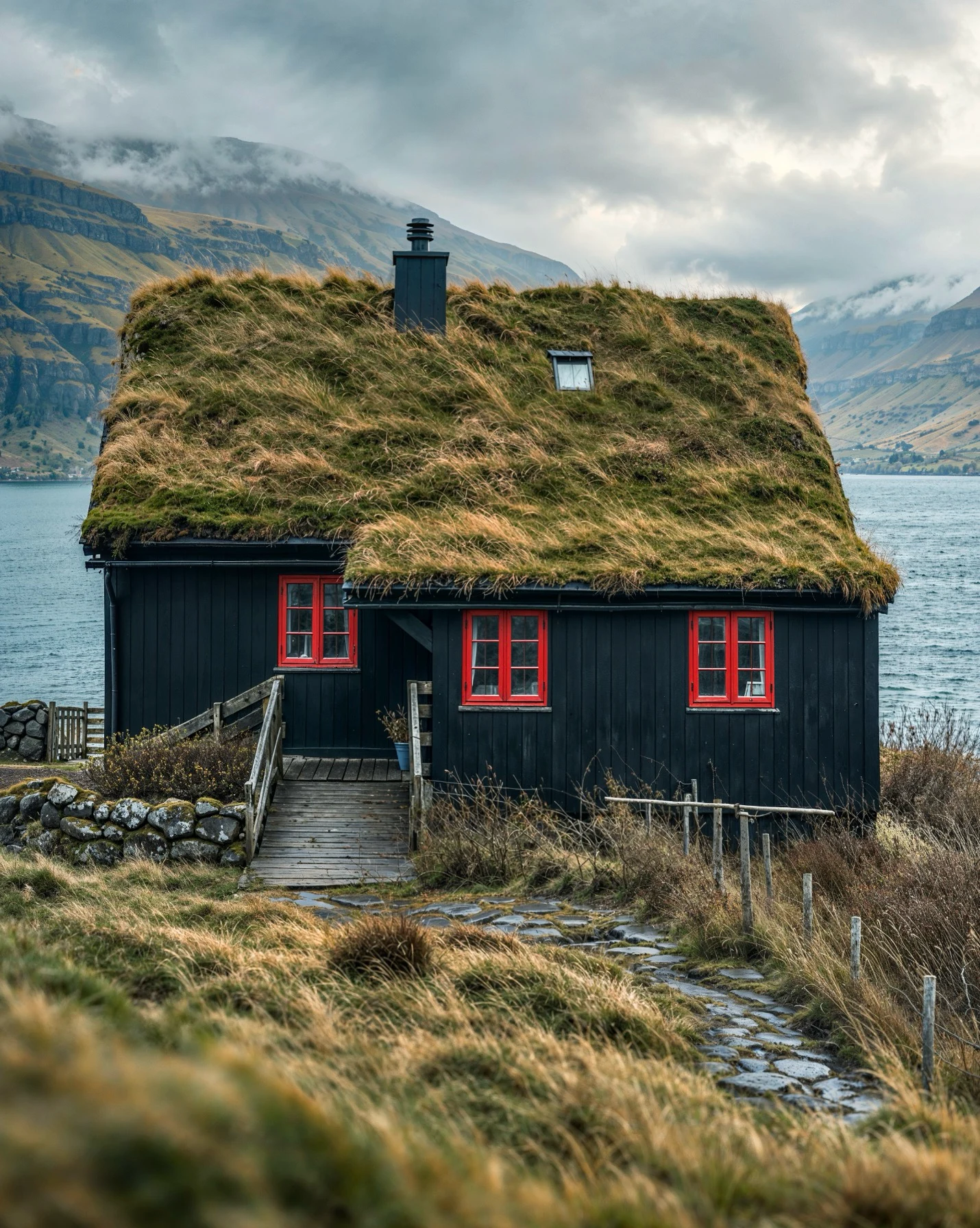
Qui vedete un altro esperimento: per prima cosa ho chiesto a ChatGPT di costruire un modello 3d della casa raffigurata nelle immagini (rendering realizzati da ChatGPT a partire da un clay uscito da Cinema 4D e V-Ray, di una scena creata qualche anno fa con Silvia Labanti).
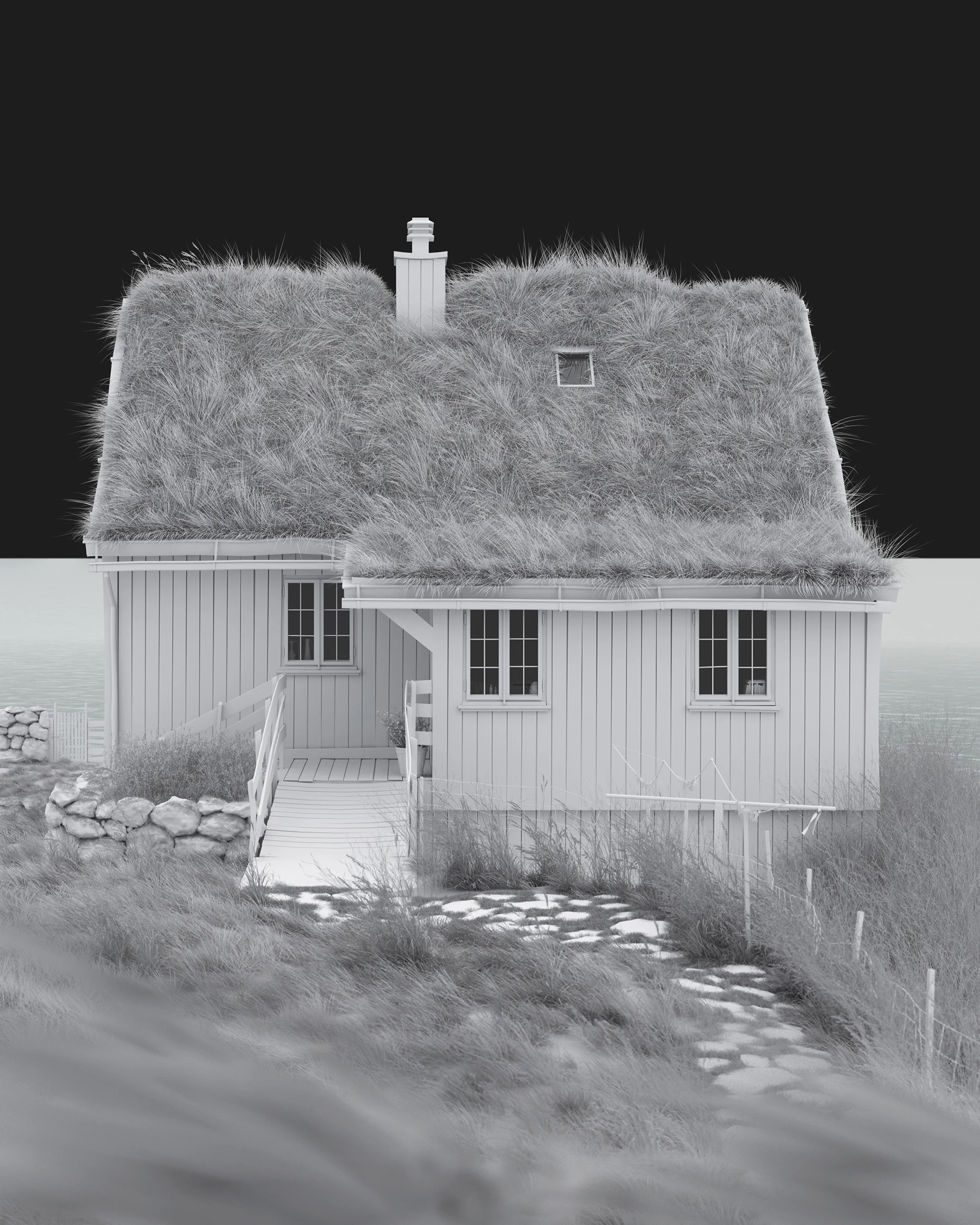
Questo è il risultato, esplorato nella viewport di Blender:
Poi ho chiesto a ChatGPT di generare un prompt che io potessi usare su Seedance 2.5 per ottenere un video come quello precedente, mostrando a ChatGPT anche la registrazione schermo e le immagini di riferimento.
Transform the uploaded gray Blender viewport video into a fully photorealistic, full-color architectural film of the traditional Faroese house shown in the two reference images.


CAMERA AND ARCHITECTURE

Follow the source video’s camera trajectory, framing, viewing direction, elevation changes, distance, speed, and timing as closely as possible. Preserve its exploration of the house, including frontal, side, and elevated views. Maintain one continuous shot with natural perspective, depth, parallax, and correct occlusion.


Keep the house stationary and firmly grounded. Preserve its geometry, proportions, roof slopes, chimney, skylight, windows, entrance, wooden access bridge, railings, paths, and stone walls. Use the source video for camera movement and spatial structure, and the reference images for the finished appearance.


HOUSE MATERIALS

Match the references’ nearly black, subtly blue-green vertical timber cladding, weathered red window frames, dark roof edging and chimney, and thick living turf roof covered in irregular moss, olive-green grass, and golden-brown blades.


Render believable wood grain, painted timber, fine weathering, glass reflections, roof vegetation, rough stone foundations, and damp surfaces. Reproduce the aged gray timber bridge and railings, irregular moss-covered dry-stone walls, and wet stone path. Keep the small entrance light softly warm.


Maintain the same material assignments and colors on every side of the building, including surfaces not visible in the reference images. Keep all window frames red throughout the shot.


LANDSCAPE AND SPATIAL CONTINUITY

Replace the empty viewport background and model platform with a continuous, realistic Faroese coastal landscape matching the references: uneven grassy terrain, mossy rocks, low shrubs, weathered fences, a cold blue-gray fjord, and steep mountains with exposed horizontal rock strata, muted grassy slopes, and low clouds.


Integrate the model’s ground plane seamlessly into the surrounding terrain, with no visible rectangular base, platform edges, or floating ground. Extend the landscape naturally in all directions.


Treat both reference images as complementary views of ONE house in ONE location. Keep the fjord, shoreline, mountains, paths, fences, and stone walls in fixed world positions as the camera moves. Reveal different parts of that same environment with correct parallax; do not rotate the landscape with the camera or use a flat photographic backdrop.


LIGHT AND PHOTOGRAPHIC LOOK

Match the references’ soft overcast Nordic daylight, cool clouded sky, low mist around distant mountain slopes, and gentle atmospheric depth. Balance deep blue-black timber and red window frames with muted olive, moss green, straw gold, and cold blue-gray water.


Preserve natural color, restrained saturation, detailed shadows, and soft highlights. Avoid an overall yellow cast or a monochrome appearance. Create editorial architectural photography with realistic textures, contact shadows, subtle moisture, and physically plausible reflections.


ENVIRONMENTAL MOTION

Use only restrained natural movement: a light breeze gently stirs individual grass blades on the roof and surrounding ground, while small ripples move across the fjord. Keep the turf roof’s overall shape unchanged and vegetation rooted in place. Distant mist may drift almost imperceptibly without hiding or changing the mountains.


Keep weather, illumination, and visibility consistent. No dramatic wind, heavy rain, large waves, or accelerated cloud movement.


TEMPORAL CONSISTENCY

Maintain stable building geometry, window placement, timber boards, stone patterns, vegetation coverage, and landscape features from beginning to end. Reflections and occlusion must respond naturally to the changing camera angle without flickering or sliding.


The entire scene must already be fully photorealistic and in color from the first frame to the last.


Avoid grayscale, clay shading, wireframes, viewport overlays, cursor marks, visible platform boundaries, floating architecture, warped roofs, changing window colors, duplicated buildings, shifting mountains, sliding textures, cuts, or transitions from gray to color. Do not add people or vehicles.
Ho dato a Seedance il video, le immagini e il prompt e questo è il risultato dopo qualche minuto di attesa:
Come avrete capito, montando insieme i due video (input e output) si ottiene l’effetto rendering in real time.
Qui sotto vedete altri esempi, fatti con lo stesso procedimento: modelli 3d generati da ChatGPT, esplorati nella viewport di Blender e trasformati in video realistici con Seedance.
Questi invece sono fatti utilizzando dei modelli 3d di scene create “manualmente” con Cinema 4D. Se seguite le mie attività sui social o avete visitato il sito Lucydreams le avrete già viste.
Conclusioni
Se questo risultato vi incuriosisce quanto ha incuriosito me, provate a riprodurlo con una vostra scena: registrate qualche movimento nella viewport, preparate le immagini di riferimento e usate il video come guida per la generazione. Poi confrontate attentamente i due video: vi accorgerete che alcuni elementi restano coerenti, altri cambiano, e altri (quelli su cui l’AI non ha informazioni sufficienti) vengono ovviamente interpretati nella maniera più plausibile. Fatemi sapere come è andata!
Preferisco condividere in modo trasparente il procedimento, evidenziare con entusiasmo i risultati ma senza nasconderne i limiti. È lo stesso approccio che porto nella mia Masterclass, dove spiego ogni passaggio apertamente e tutte le domande trovano uno spazio di dialogo, anche quelle più scomode o provocatorie, anzi sono sempre quelle da cui nascono i dibattiti più costruttivi.
ANGELO FERRETTI
Mi chiamo Angelo, le mie passioni più grandi che coltivo da oltre 20 anni sono l’insegnamento e la creazione di immagini orientate all’architettura e al design di interni.